Photo to video
AI photo to video, your product on a virtual model
AI photo to video in Torbilo: pick a photo you made and a motion, and get a short video of your product on a model: tall for Reels and Shorts, or square for feeds. It keeps the face, the outfit and the scene. No filming, no editing. New accounts get 25 free credits, enough for five photos on a model.
Made in the app
Real clips, from one photo each
Slip dress: gentle sway
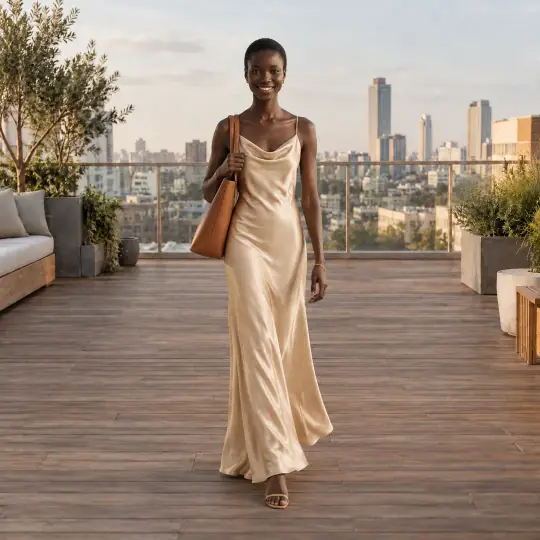
Before · Finished photo
After · Gentle sway, tall
Lehenga: twirl
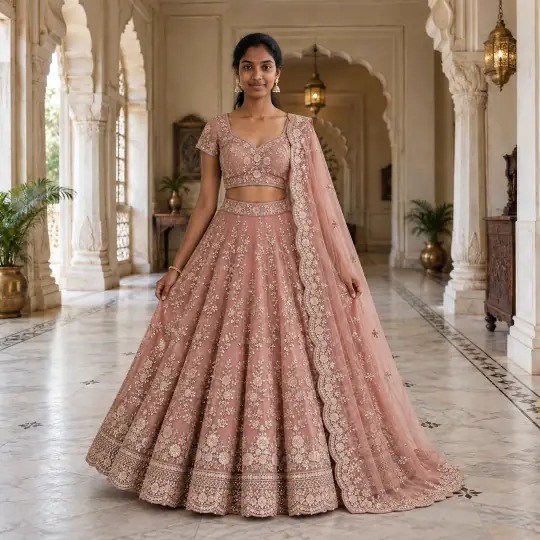
Before · Finished photo
After · Twirl, tall
Both clips were made in the Torbilo app at Standard size from the photo beside them, as earlier 5-second samples. They play muted here.
How it works
How do I turn a photo into a video?
- Choose a photoOpen a finished photo and choose Make a video. Or start from scratch with up to three people wearing your products.
- Pick the motionChoose a preset motion or describe your own in up to 300 characters, with up to four extra pictures. Then tall 9:16 (4, 6 or 8 seconds) or square 1:1 (5 seconds).
- Get your clipIt appears under the shoot with a play button. Save it or share it. If it can't be made, your credits come back.
What it costs
How much does a product video cost?
5 credits per second, Standard
- Full HD is 10 credits per second, on the 8-second tall clip.
- Example: a 6-second Standard clip is 30 credits. A 5-second square clip is 25 credits, or 50 in Full HD.
- The price on the button updates as you choose. Sound costs nothing extra.
Introductory prices today. Credits never expire while your account is open, whether they come from a pack, a top-up or a monthly plan. See packs and plans.
Good to know
Before you start
- Videos are made for adult models and ghost mannequins. Models under 18 never get videos.
- Preset motions stay in place, so the person does not walk out of frame.
- Videos are silent unless you describe a sound.
- Every video carries an AI-generated tag in the file.
Questions
AI product videos from a photo: questions
Can I turn a photo into a video with AI?
Yes. Choose a finished photo, pick a motion and a shape, and Torbilo makes a short clip of the same person in the same outfit and scene.
How long can the video be?
4, 6 or 8 seconds tall, or 5 seconds square.
What is a virtual model video?
A short video of your product worn by an AI model, made from a still photo, so you don't film anyone.
Can I use my own idea for the motion?
Yes. Describe what happens in up to 300 characters and add up to four of your own pictures, such as a bag or a flower.
What if the video fails?
You are not charged: the credits come back, and you can try again with the same choices.
Keep going
One account, every kind of photo
Every feature works on the same products and the same credits.